k6로 product 조회에 대한 로드 테스트를 진행했습니다.
검색 테스트 스크립트
backend/scripts/k6/search.js
import http from "k6/http";
import { check, sleep } from "k6";

/**
 * /api/products 부하 — simple : complex : keyword = 3 : 1 : 1 (병렬, ramping)
 *
 *   k6 run scripts/k6/search.js
 *   k6 run -e TOTAL_VUS=1000 scripts/k6/search.js
 *   k6 run -e RAMP_UP=2m -e HOLD=10m scripts/k6/search.js
 *
 * Slow request log (default >= 1000 ms), one line: tag | duration | status | url
 *   k6 run scripts/k6/search.js 2> scripts/k6/slow-requests.log
 *   Select-String slow-requests.log '\[SLOW\]'
 *   k6 run -e LOG_SLOW=0 scripts/k6/search.js   # disable
 */

const BASE_URL = __ENV.BASE_URL || "http://localhost:8080";
const SLOW_MS = Number(__ENV.SLOW_MS || 1000);
const LOG_SLOW = __ENV.LOG_SLOW !== "0";
const SIZE = Number(__ENV.SIZE || 12);
const RAMP_UP = __ENV.RAMP_UP || "30s";
const HOLD = __ENV.HOLD || __ENV.DURATION || "30s";
const THINK_MIN_MS = Number(__ENV.THINK_MIN_MS || 200);
const THINK_MAX_MS = Number(__ENV.THINK_MAX_MS || 900);

const TOTAL_VUS = Number(__ENV.TOTAL_VUS || 20);
const SIMPLE_VUS = Math.floor((TOTAL_VUS * 3) / 5);
const COMPLEX_VUS = Math.floor(TOTAL_VUS / 5);
const KEYWORD_VUS = TOTAL_VUS - SIMPLE_VUS - COMPLEX_VUS;

export function setup() {
  if (__ENV.TOTAL_VUS) {
    console.log(
      `[k6] TOTAL_VUS=${TOTAL_VUS} → simple=${SIMPLE_VUS}, complex=${COMPLEX_VUS}, keyword=${KEYWORD_VUS} (3:1:1, ramp ${RAMP_UP} + hold ${HOLD})`,
    );
  }
}

const CATEGORIES = ["TOP", "BOTTOM", "OUTER", "SHOES", "GLASSES", "HAT"];
const BRANDS = [
  "Nike", "Adidas", "Puma", "New Balance", "Under Armour", "Converse", "Reebok", "Fila",
  "Asics", "Lululemon", "Jordan", "Vans", "Skechers", "Champion", "Levis", "Patagonia",
  "The North Face", "Columbia", "Oakley", "Carhartt",
];
const COLORS = ["BLACK", "WHITE", "NAVY", "GRAY", "BEIGE", "RED", "BLUE", "GREEN"];
const GENDERS = ["MEN", "WOMEN", "UNISEX"];
const KEYWORDS = [
  "Nike", "Adidas", "Hoodie", "T-Shirt", "SHOES", "MEN", "WOMEN", "Carhartt",
  "North Face", "Oakley", "Jacket", "Running",
];
const KEYWORD_TYPOS = ["Nikke", "Nkie", "Adidass", "Pumma", "Hoodi", "Sneeker", "Jaket"];
const KEYWORD_COMBOS = [
  "Nike Hoodie", "Adidas MEN", "Nike Running", "Puma Sneakers", "North Face Jacket",
  "Under Armour Shirt", "New Balance Shoes", "Converse WOMEN", "Reebok T-Shirt", "Columbia OUTER",
];

function rampScenario(target, exec, scenario) {
  return {
    executor: "ramping-vus",
    startVUs: 0,
    stages: [
      { duration: RAMP_UP, target },
      { duration: HOLD, target },
    ],
    gracefulRampDown: "30s",
    exec,
    tags: { scenario },
  };
}

export const options = {
  scenarios: {
    simple: rampScenario(SIMPLE_VUS, "simpleBrowse", "simple"),
    complex_filters: rampScenario(COMPLEX_VUS, "complexFiltersRandom", "complex"),
    keyword_search: rampScenario(KEYWORD_VUS, "keywordSearchRandom", "keyword"),
  },
};

function query(params) {
  const parts = [];
  for (const [k, v] of Object.entries(params)) {
    if (v != null && v !== "") parts.push(`${encodeURIComponent(k)}=${encodeURIComponent(v)}`);
  }
  return parts.length ? `?${parts.join("&")}` : "";
}

function pick(arr) {
  return arr[Math.floor(Math.random() * arr.length)];
}

function priceBand() {
  const r = Math.random();
  if (r < 0.55) return { minPrice: 40000, maxPrice: 180000 };
  if (r < 0.8) return { minPrice: 10000, maxPrice: 50000 };
  if (r < 0.93) return { minPrice: 150000, maxPrice: 350000 };
  return { minPrice: 20000, maxPrice: 400000 };
}

function getProducts(params, name) {
  const path = `/api/products${query(params)}`;
  const res = http.get(`${BASE_URL}${path}`, { tags: { name } });
  if (LOG_SLOW && res.timings.duration >= SLOW_MS) {
    const ms = Math.round(res.timings.duration);
    console.log(`[SLOW] ${name} | ${ms}ms | ${res.status} | ${path}`);
  }
  check(res, {
    [`${name} status 200`]: (r) => r.status === 200,
    [`${name} success`]: (r) => r.json("success") === true,
    [`${name} items array`]: (r) => Array.isArray(r.json("data.items")),
  });
}

function think() {
  const ms = THINK_MIN_MS + Math.floor(Math.random() * (THINK_MAX_MS - THINK_MIN_MS + 1));
  sleep(ms / 1000);
}

export function simpleBrowse() {
  const r = Math.random();
  if (r < 0.68) getProducts({ page: 0, size: SIZE, sortBy: "LATEST" }, "simple-latest");
  else if (r < 0.88) getProducts({ page: 0, size: SIZE, sortBy: "LATEST", category: pick(CATEGORIES) }, "simple-category");
  else if (r < 0.96) getProducts({ page: 0, size: SIZE, sortBy: "POPULARITY" }, "simple-popularity");
  else getProducts({ page: 0, size: SIZE, sortBy: "POPULARITY", category: pick(CATEGORIES) }, "simple-cat-pop");
  think();
}

const COMPLEX_PROFILES = [
  { w: 0.2, tag: "complex-kw-only", extra: () => ({ keyword: pick(KEYWORDS) }) },
  { w: 0.14, tag: "complex-cat-only", extra: () => ({ category: pick(CATEGORIES) }) },
  { w: 0.12, tag: "complex-cat-brand", extra: () => ({ category: pick(CATEGORIES), brand: pick(BRANDS) }) },
  {
    w: 0.1,
    tag: "complex-cat-gender-color",
    extra: () => ({ category: pick(CATEGORIES), gender: pick(GENDERS), color: pick(COLORS) }),
  },
  { w: 0.08, tag: "complex-price", extra: priceBand },
  { w: 0.08, tag: "complex-kw-cat", extra: () => ({ keyword: pick(KEYWORDS), category: pick(CATEGORIES) }) },
  { w: 0.08, tag: "complex-brand-gender", extra: () => ({ brand: pick(BRANDS), gender: pick(GENDERS) }) },
  {
    w: 0.08,
    tag: "complex-stack",
    extra: () => ({
      category: pick(CATEGORIES),
      brand: pick(BRANDS),
      gender: pick(GENDERS),
      color: pick(COLORS),
      ...priceBand(),
    }),
  },
  { w: 0.06, tag: "complex-kw-price", extra: () => ({ keyword: pick(KEYWORDS), ...priceBand() }) },
  {
    w: 0.06,
    tag: "complex-full",
    extra: () => ({
      keyword: pick(KEYWORDS),
      category: pick(CATEGORIES),
      brand: pick(BRANDS),
      gender: pick(GENDERS),
      color: pick(COLORS),
      ...priceBand(),
    }),
  },
];

export function complexFiltersRandom() {
  const base = { page: 0, size: SIZE, sortBy: Math.random() < 0.88 ? "LATEST" : "POPULARITY" };
  let u = Math.random();
  for (const p of COMPLEX_PROFILES) {
    if ((u -= p.w) < 0) {
      getProducts({ ...base, ...p.extra() }, p.tag);
      think();
      return;
    }
  }
  const last = COMPLEX_PROFILES[COMPLEX_PROFILES.length - 1];
  getProducts({ ...base, ...last.extra() }, last.tag);
  think();
}

export function keywordSearchRandom() {
  const base = { size: SIZE, sortBy: Math.random() < 0.85 ? "LATEST" : "POPULARITY" };
  const u = Math.random();
  if (u < 0.4) getProducts({ ...base, keyword: pick(KEYWORD_TYPOS) }, "kw-typo");
  else if (u < 0.8) getProducts({ ...base, keyword: pick(KEYWORD_COMBOS) }, "kw-combo");
  else getProducts({ ...base, keyword: pick(KEYWORDS) }, "kw-single");
  think();
}
| simple | simpleBrowse | 가벼운 조회 (트래픽 대부분) |
| complex | complexFiltersRandom | 필터 조합 |
| keyword | keywordSearchRandom | 키워드 오타, 조합 (pg_trgm / word_similarity 부하) |
각 시나리오에서, 각 필터와 키워드에 랜덤값을 줬습니다.
그리고 현실적인 데이터를 위해서 검색이 자주 될 것 같은 데이터에 더 큰 가중치를 줬습니다.
환경변수 설명
| BASE_URL | http://localhost:8080 | API 베이스 URL |
| SIZE | 12 | 페이지 크기 (ProductController 기본과 동일) |
| DURATION | 30s | 시나리오 지속 시간 |
| THINK_MIN_MS / THINK_MAX_MS | 200 / 900 | 요청 사이 think time (ms, 랜덤) |
vus가 서서히 늘어나도록 stage를 두 단계로 나눴습니다.
1. ramp-up (vus가 서서히 늘어남)
2. hold (이후 vus 유지하며 진행)
실행 명령어
k6 run -o experimental-prometheus-rw --tag testid=test -e TOTAL_VUS=20 -e DURATION=30s scripts/k6/search.js 2> scripts/k6/slow-requests.log

grafana 대시보드 분석
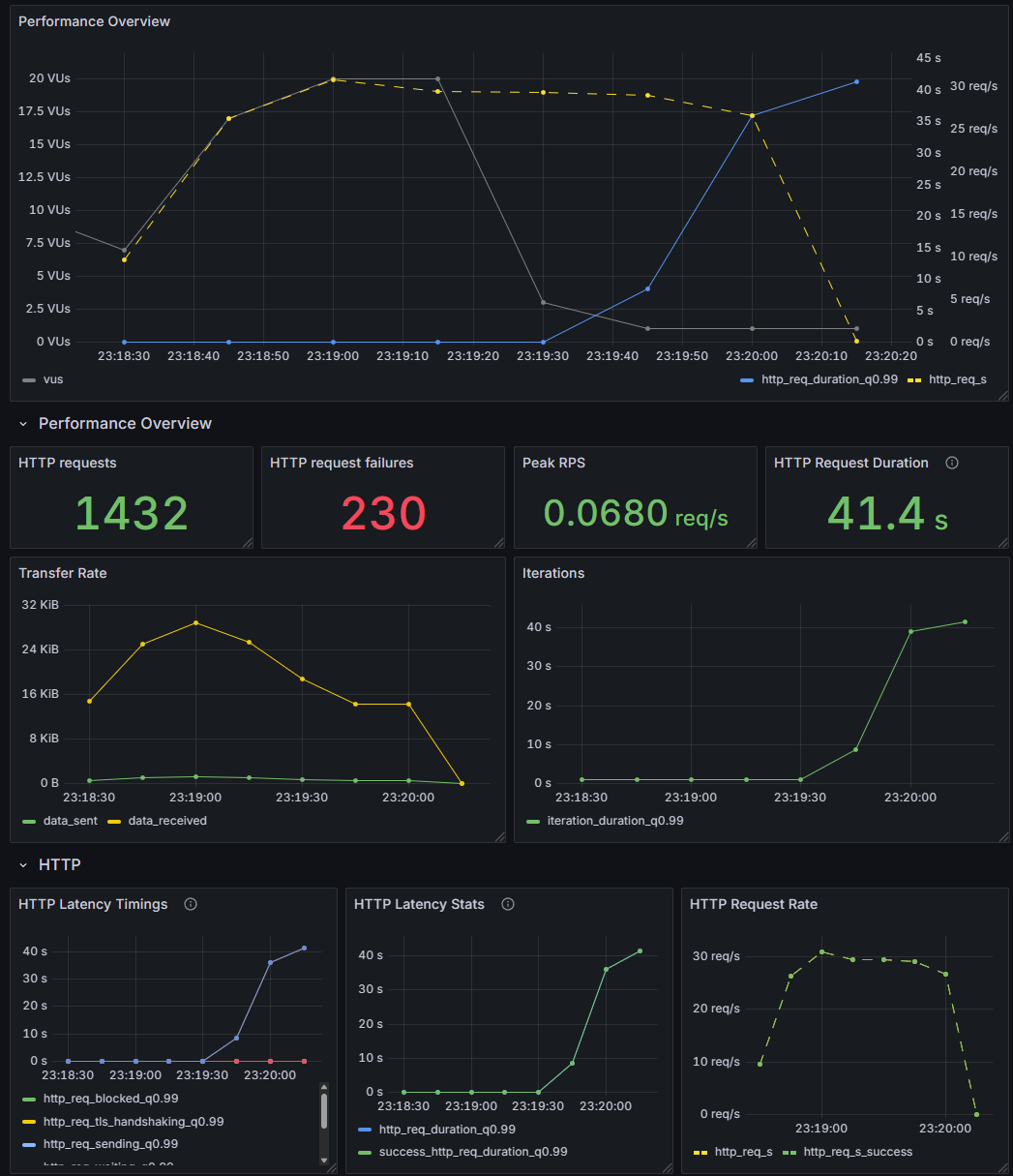
각 요청은 k6의 tags.name로 라벨링되어, Grafana에서 시나리오별로 지표를 분리해서 볼 수 있습니다
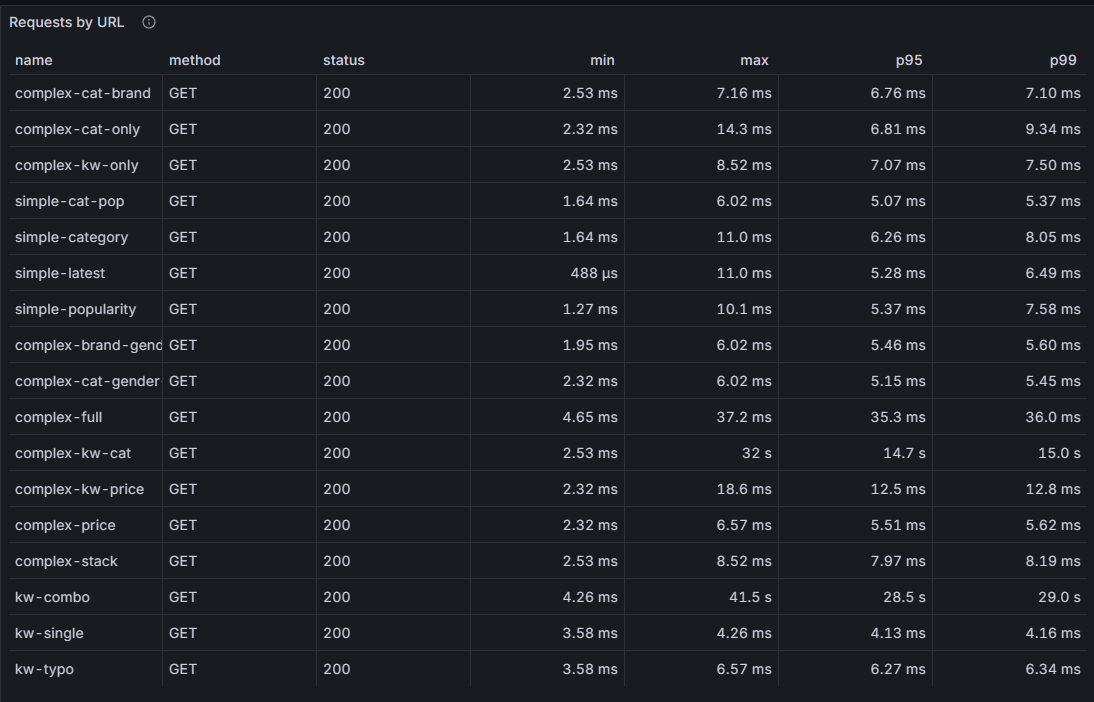
vus가 20일때 평균적인 성능은 괜찮습니다만,
complex-kw-cat, kw-combo, 즉 다중 키워드 + 필터 검색 시나리오에서 성능이 매우 튑니다.
그리고 실험을 통해 엣지케이스가 몇가지 더 있음을 확인했습니다.
=== E3: no-match keyword - bmw (not in seed; LIKE + word_similarity, expect 0 rows, slow scan) ===
                                                                          QUERY PLAN
---------------------------------------------------------------------------------------------------------------------------------------------------------------
 Limit  (cost=0.43..3.54 rows=12 width=16) (actual time=35807.309..35807.310 rows=0 loops=1)
   Buffers: shared hit=30773 read=235424
   ->  Index Scan using idx_products_created_at_id on products  (cost=0.43..931387.62 rows=3600180 width=16) (actual time=35807.309..35807.309 rows=0 loops=1)
         Filter: ((lower((name)::text) ~~ '%bmw%'::text) OR (word_similarity('bmw'::text, lower((name)::text)) > '0.35'::double precision))
         Rows Removed by Filter: 10000500
         Buffers: shared hit=30773 read=235424
 Planning:
   Buffers: shared hit=1
 Planning Time: 0.053 ms
 Execution Time: 35807.342 ms
(10 rows)
우선 DB 내부에 유사도가 너무 낮은 키워드일때, 12건을 빠르게 찾지 못하면
테이블 전체를 스캔하고, 행마다 문자열을 비교하고 유사도 함수를 실행하느라,
이 검색에 약 35초나 걸렸습니다.
QueryDSL + Hibernate 환경에서 postgreSQL의 특정 연산자와 호환이 좋지 않고,
이를 해결할 좋은 방법을 찾지 못해서, 일단 유사도 검색을 포기하고 다시 진행했습니다.

유사도 검색은 제거했으나, 키워드와 필터의 조합에서 여전히 많은 병목이 생겼습니다.
텍스트 검색(GIN)과 필터 검색(B-Tree)을 혼합하여 검색하기 때문에, 만약 둘 중 하나가 먼저 실행된다면, 나머지 인덱스를 사용할 수 없어서, 최악의 경우 매우 느려집니다.
만약 필터로 걸러진 데이터가 백만개라면, 그 안에서 키워드 검색에 GIN INDEX를 사용할 수 없어 매우 느려집니다.
function getProducts(params, name) {
  const path = `/api/products${query(params)}`;
  const res = http.get(`${BASE_URL}${path}`, { tags: { name } });
  if (LOG_SLOW && res.timings.duration >= SLOW_MS) {
    const ms = Math.round(res.timings.duration);
    console.log(`[SLOW] ${name} | ${ms}ms | ${res.status} | ${path}`);
  }
  check(res, {
    [`${name} status 200`]: (r) => r.status === 200,
    [`${name} success`]: (r) => r.json("success") === true,
    [`${name} items array`]: (r) => Array.isArray(r.json("data.items")),
  });
}
여기서부터 k6 테스트에서 1초가 넘는 slow request에 대한 로그를 받아보기로 했습니다.
k6 : time="2026-05-22T14:55:02+09:00" level=info msg="[k6] TOTAL_VUS=20 ??simple=12, complex=4, keyword=4 (3:1:1, r
amp 30s + hold 30s)" source=console
위치 줄:1 문자:1
+ k6 run -o experimental-prometheus-rw --tag testid=test -e TOTAL_VUS=2 ...
+ ~~~~~~~~~~~~~~~~~~~~~~~~~~~~~~~~~~~~~~~~~~~~~~~~~~~~~~~~~~~~~~~~~~~~~
    + CategoryInfo          : NotSpecified: (time="2026-05-2... source=console:String) [], RemoteException
    + FullyQualifiedErrorId : NativeCommandError

time="2026-05-22T14:55:12+09:00" level=info msg="[SLOW] complex-kw-cat | 1425ms | 200 | /api/products?page=0&size=1
2&sortBy=LATEST&keyword=North%20Face&category=GLASSES" source=console
time="2026-05-22T14:55:14+09:00" level=info msg="[SLOW] complex-kw-cat | 1927ms | 200 | /api/products?page=0&size=1
2&sortBy=LATEST&keyword=Jacket&category=GLASSES" source=console
time="2026-05-22T14:55:21+09:00" level=info msg="[SLOW] complex-kw-cat | 1492ms | 200 | /api/products?page=0&size=1
2&sortBy=LATEST&keyword=North%20Face&category=HAT" source=console
time="2026-05-22T14:55:22+09:00" level=info msg="[SLOW] kw-combo | 2032ms | 200 | /api/products?size=12&sortBy=LATE
ST&keyword=Converse%20WOMEN" source=console
time="2026-05-22T14:55:38+09:00" level=info msg="[SLOW] complex-kw-cat | 1523ms | 200 | /api/products?page=0&size=1
2&sortBy=LATEST&keyword=North%20Face&category=HAT" source=console
time="2026-05-22T14:55:39+09:00" level=info msg="[SLOW] complex-kw-cat | 2004ms | 200 | /api/products?page=0&size=1
2&sortBy=LATEST&keyword=Jacket&category=BOTTOM" source=console
time="2026-05-22T14:55:50+09:00" level=info msg="[SLOW] complex-kw-cat | 1466ms | 200 | /api/products?page=0&size=1
2&sortBy=LATEST&keyword=North%20Face&category=BOTTOM" source=console
time="2026-05-22T14:55:51+09:00" level=info msg="[SLOW] kw-combo | 2012ms | 200 | /api/products?size=12&sortBy=LATE
ST&keyword=Converse%20WOMEN" source=console
time="2026-05-22T14:55:56+09:00" level=info msg="[SLOW] complex-kw-cat | 2009ms | 200 | /api/products?page=0&size=1
2&sortBy=LATEST&keyword=Running&category=OUTER" source=console
time="2026-05-22T14:55:58+09:00" level=info msg="[SLOW] complex-kw-cat | 2054ms | 200 | /api/products?page=0&size=1
2&sortBy=LATEST&keyword=SHOES&category=TOP" source=console
time="2026-05-22T14:56:03+09:00" level=info msg="[SLOW] complex-kw-cat | 1411ms | 200 | /api/products?page=0&size=1
2&sortBy=POPULARITY&keyword=North%20Face&category=GLASSES" source=console
로깅 결과, 카테고리와 상관없는 키워드를 조합해 검색할 경우 시간이 오래 걸립니다.
=== K1: complex-kw-cat - Shirt + category BOTTOM ===
                                                                         QUERY PLAN
------------------------------------------------------------------------------------------------------------------------------------------------------------
 Limit  (cost=0.43..64.06 rows=12 width=16) (actual time=2038.818..2038.828 rows=0 loops=1)
   Buffers: shared hit=10748 read=255525
   ->  Index Scan using idx_products_created_at_id on products  (cost=0.43..881396.36 rows=166227 width=16) (actual time=2038.817..2038.817 rows=0 loops=1)
         Filter: (((category)::text = 'BOTTOM'::text) AND (lower((name)::text) ~~ '%shirt%'::text))
         Rows Removed by Filter: 10000500
         Buffers: shared hit=10748 read=255525
 Planning:
   Buffers: shared hit=231 read=3 dirtied=2
 Planning Time: 2.740 ms
 Execution Time: 2038.875 ms
(10 rows)
full scan으로 6.7초(6768ms)가 걸렸으며, GIN INDEX를 타지 못한 결과입니다.
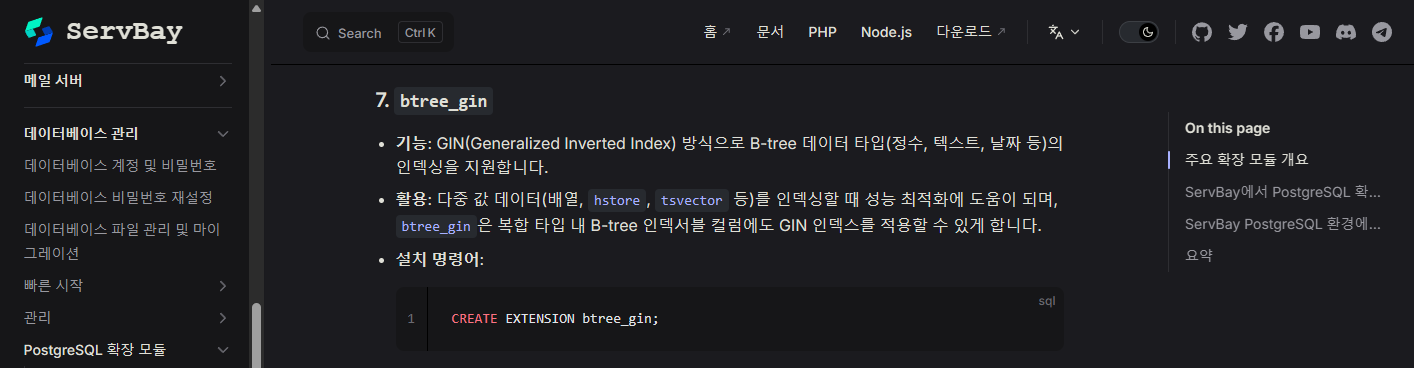
porstgre에서는 공식 확장 모듈로 btree_gin을 지원합니다.
이를 이용하면 필터 검색도 GIN 인덱스 안에 넣어서 한번에 처리할 수 있습니다.
-- Composite GIN (btree_gin): same equality keys as V5 filter indexes + name trigram.
-- category, brand, gender, color + lower(name) in one index for filter+keyword without BitmapAnd.
-- V5 B-tree stays for filter-only paths and ORDER BY created_at|popularity (GIN cannot replace sort).
-- V6 name-only GIN stays for keyword without those equality filters.
-- On ~10M rows, index build can take several minutes.

CREATE EXTENSION IF NOT EXISTS btree_gin;

CREATE INDEX idx_products_filter_name_trgm
    ON products
    USING gin (
        category,
        brand,
        gender,
        color,
        lower(name) gin_trgm_ops
    );
btree_gin에 복합 필터를 적용했습니다.
하지만 정렬 요소는 포함할 수 없었습니다.
왜냐하면 GIN 인덱스는 키워드에 의한 "집합" 인덱스이지, 순서 인덱스가 아니기 때문입니다.
Limit  (cost=3075.97..3076.00 rows=12 width=16) (actual time=2786.360..2786.362 rows=12 loops=1)
   Buffers: shared hit=1046 read=16868
   ->  Sort  (cost=3075.97..3076.79 rows=328 width=16) (actual time=2786.359..2786.360 rows=12 loops=1)
         Sort Key: created_at DESC, id DESC
         Sort Method: top-N heapsort  Memory: 25kB
         Buffers: shared hit=1046 read=16868
         ->  Bitmap Heap Scan on products  (cost=1786.49..3068.45 rows=328 width=16) (actual time=273.023..2774.212 rows=16452 loops=1)
               Recheck Cond: ((lower((name)::text) ~~ '%north%'::text) AND (lower((name)::text) ~~ '%face%'::text) AND (lower((name)::text) ~~ '%jacket%'::text))
               Heap Blocks: exact=15806
               Buffers: shared hit=1040 read=16868
               ->  Bitmap Index Scan on idx_products_name_lower_trgm  (cost=0.00..1786.41 rows=328 width=0) (actual time=271.108..271.108 rows=16452 loops=1)
                     Index Cond: ((lower((name)::text) ~~ '%north%'::text) AND (lower((name)::text) ~~ '%face%'::text) AND (lower((name)::text) ~~ '%jacket%'::text))
                     Buffers: shared hit=1039 read=1063
 Planning:
   Buffers: shared hit=3
 Planning Time: 0.196 ms
 Execution Time: 2786.895 ms
(17 rows)
Bitmap Heap Scan on products (actual time=273.023..2774.212 rows=16452) Heap Blocks: exact=15806 Buffers: shared hit=1040 read=16868
여기가 성능 병목 구간입니다. GIN 인덱스에는 상품의 이름 정보만 있지, 정렬에 필요한 created_at 값은 없습니다.데이터베이스는 16,452건의 created_at을 알아내기 위해 실제 테이블에서 조회를 시작합니다. 여기서만 2.5초가 소요됐습니다.
대용량 데이터에서 postgreDB만으로 필터(B-Tree), 정렬(B-Tree), Keyword(GIN)을 한번에 처리하기는 어렵습니다.
검색엔진을 따로 만들어야 효율적인 검색을 할 수 있을것이라고 판단이 됩니다.
저는 ElasticSearch를 도입하기로 했습니다.
'백엔드 엔지니어링 일지' 카테고리의 다른 글
| 마켓 백엔드 엔진 13 : ElasticSearch - 2 / Redis 캐싱 (0) | 2026.05.28 |
|---|---|
| 마켓 백엔드 엔진 12 : ElasticSearch - 1 (0) | 2026.05.26 |
| 마켓 백엔드 엔진 10 : 키워드 조합/유사도 검색 - pg_trgm (0) | 2026.05.18 |
| 마켓 백엔드 엔진 9 : k6 부하 테스트 - Prometheus, Grafana 연동 (0) | 2026.05.13 |
| 마켓 백엔드 엔진 8 : 검색 쿼리 튜닝 (EXPLAIN ANALYZE, Index, Page, Slice) (0) | 2026.05.03 |


