검색을 postgre -> ElasticSearch로 전환합니다.
ProductListSearcher.java
package com.marketengine.backend.product.application;

import org.springframework.data.domain.Pageable;
import org.springframework.data.domain.Slice;

import com.marketengine.backend.product.api.ProductDtos.ProductSummaryResponse;
import com.marketengine.backend.product.domain.ProductCategory;

/**
 * Product list/search port (step 5: default implementation uses Elasticsearch).
 */
public interface ProductListSearcher {

    Slice<ProductSummaryResponse> search(
            String keyword,
            ProductCategory category,
            String brand,
            String gender,
            String color,
            Integer minPrice,
            Integer maxPrice,
            String sortBy,
            Pageable pageable
    );
}
service에서 호출합니다.
JpaProductListSearcher.java
package com.marketengine.backend.product.infrastructure.search;

import org.springframework.boot.autoconfigure.condition.ConditionalOnProperty;
import org.springframework.data.domain.Pageable;
import org.springframework.data.domain.Slice;
import org.springframework.stereotype.Component;

import com.marketengine.backend.product.api.ProductDtos.ProductSummaryResponse;
import com.marketengine.backend.product.application.ProductListSearcher;
import com.marketengine.backend.product.domain.ProductCategory;
import com.marketengine.backend.product.domain.ProductRepository;

import lombok.RequiredArgsConstructor;

/**
 * Fallback list/search using PostgreSQL (QueryDSL via {@link com.marketengine.backend.product.domain.ProductRepositoryImpl}).
 */
@Component
@RequiredArgsConstructor
@ConditionalOnProperty(prefix = "marketengine.search", name = "backend", havingValue = "postgres")
public class JpaProductListSearcher implements ProductListSearcher {

    private final ProductRepository productRepository;

    @Override
    public Slice<ProductSummaryResponse> search(
            String keyword,
            ProductCategory category,
            String brand,
            String gender,
            String color,
            Integer minPrice,
            Integer maxPrice,
            String sortBy,
            Pageable pageable
    ) {
        return productRepository.search(
                keyword,
                category,
                brand,
                gender,
                color,
                minPrice,
                maxPrice,
                sortBy,
                pageable
        ).map(ProductSummaryResponse::from);
    }
}
marketengine:
  search:
    backend: elasticsearch
공통 searcher interface를 두고 Jpa와 ES 검색을 분기했습니다.
환경변수 marketengine.search.backend 값에 따라서 es, pg 검색을 선택할 수 있습니다.
ElasticsearchProductListSearcher.java
package com.marketengine.backend.product.infrastructure.search;

import java.util.ArrayList;
import java.util.List;
import java.util.Locale;

import org.springframework.boot.autoconfigure.condition.ConditionalOnProperty;
import org.springframework.data.domain.PageRequest;
import org.springframework.data.domain.Pageable;
import org.springframework.data.domain.Slice;
import org.springframework.data.domain.SliceImpl;
import org.springframework.data.elasticsearch.client.elc.NativeQuery;
import org.springframework.data.elasticsearch.core.ElasticsearchOperations;
import org.springframework.data.elasticsearch.core.SearchHit;
import org.springframework.data.elasticsearch.core.SearchHits;
import org.springframework.stereotype.Component;

import com.marketengine.backend.product.api.ProductDtos.ProductSummaryResponse;
import com.marketengine.backend.product.application.ProductListSearcher;
import com.marketengine.backend.product.domain.ProductCategory;

import co.elastic.clients.elasticsearch._types.SortOptions;
import co.elastic.clients.elasticsearch._types.SortOrder;
import co.elastic.clients.elasticsearch._types.query_dsl.BoolQuery;
import co.elastic.clients.elasticsearch._types.query_dsl.Query;
import lombok.RequiredArgsConstructor;

/**
 * Step 5: list/search via Elasticsearch (match AND on name tokens, keyword filters, slice paging).
 */
@Component
@RequiredArgsConstructor
@ConditionalOnProperty(prefix = "marketengine.search", name = "backend", havingValue = "elasticsearch", matchIfMissing = true)
public class ElasticsearchProductListSearcher implements ProductListSearcher {

    private static final int KEYWORD_MIN_LENGTH = 2;

    private final ElasticsearchOperations elasticsearchOperations;

    @Override
    public Slice<ProductSummaryResponse> search(
            String keyword,
            ProductCategory category,
            String brand,
            String gender,
            String color,
            Integer minPrice,
            Integer maxPrice,
            String sortBy,
            Pageable pageable
    ) {
        int fetchSize = pageable.getPageSize() + 1;
        Pageable fetchPageable = PageRequest.of(pageable.getPageNumber(), fetchSize, pageable.getSort());

        NativeQuery query = NativeQuery.builder()
                .withQuery(buildQuery(keyword, category, brand, gender, color, minPrice, maxPrice))
                .withSort(buildSort(sortBy))
                .withPageable(fetchPageable)
                .build();

        SearchHits<ProductDocument> hits = elasticsearchOperations.search(query, ProductDocument.class);

        List<ProductSummaryResponse> items = hits.getSearchHits().stream()
                .map(SearchHit::getContent)
                .map(ElasticsearchProductListSearcher::toSummary)
                .toList();

        boolean hasNext = items.size() > pageable.getPageSize();
        if (hasNext) {
            items = new ArrayList<>(items.subList(0, pageable.getPageSize()));
        }

        return new SliceImpl<>(items, pageable, hasNext);
    }

    private static Query buildQuery(
            String keyword,
            ProductCategory category,
            String brand,
            String gender,
            String color,
            Integer minPrice,
            Integer maxPrice
    ) {
        BoolQuery.Builder bool = new BoolQuery.Builder();

        appendKeywordMust(bool, keyword);

        if (category != null) {
            bool.filter(filterTerm("category", category.name()));
        }
        if (hasText(brand)) {
            bool.filter(filterTerm("brand", brand.trim()));
        }
        if (hasText(gender)) {
            bool.filter(filterTerm("gender", gender.trim()));
        }
        if (hasText(color)) {
            bool.filter(filterTerm("color", color.trim()));
        }
        if (minPrice != null) {
            bool.filter(filterRangeGte("priceAmount", minPrice.doubleValue()));
        }
        if (maxPrice != null) {
            bool.filter(filterRangeLte("priceAmount", maxPrice.doubleValue()));
        }

        return Query.of(query -> query.bool(bool.build()));
    }

    private static void appendKeywordMust(BoolQuery.Builder bool, String keyword) {
        if (!hasText(keyword)) {
            return;
        }
        String[] tokens = keyword.trim().toLowerCase(Locale.ROOT).split("\\s+");
        for (String token : tokens) {
            if (token.length() < KEYWORD_MIN_LENGTH) {
                continue;
            }
            bool.must(must -> must.match(match -> match.field("name").query(token)));
        }
    }

    private static Query filterTerm(String field, String value) {
        return Query.of(query -> query.term(term -> term.field(field).value(value)));
    }

    private static Query filterRangeGte(String field, double min) {
        return Query.of(query -> query.range(range -> range.number(number -> number.field(field).gte(min))));
    }

    private static Query filterRangeLte(String field, double max) {
        return Query.of(query -> query.range(range -> range.number(number -> number.field(field).lte(max))));
    }

    private static List<SortOptions> buildSort(String sortBy) {
        if ("POPULARITY".equalsIgnoreCase(sortBy)) {
            return List.of(
                    SortOptions.of(sort -> sort.field(field -> field.field("popularityScore").order(SortOrder.Desc))),
                    SortOptions.of(sort -> sort.field(field -> field.field("id").order(SortOrder.Desc)))
            );
        }
        return List.of(
                SortOptions.of(sort -> sort.field(field -> field.field("createdAt").order(SortOrder.Desc))),
                SortOptions.of(sort -> sort.field(field -> field.field("id").order(SortOrder.Desc)))
        );
    }

    private static boolean hasText(String value) {
        return value != null && !value.trim().isEmpty();
    }

    private static ProductSummaryResponse toSummary(ProductDocument document) {
        return new ProductSummaryResponse(
                document.getId(),
                document.getName(),
                document.getPriceAmount(),
                document.getStockQuantity(),
                ProductCategory.valueOf(document.getCategory()),
                document.getBrand(),
                document.getColor(),
                document.getGender(),
                document.getPopularityScore(),
                document.getCreatedAt()
        );
    }
}
ElasticSearch의 Query DSL은 검색 문법입니다. (JPA QueryDSL과는 별개입니다)
NativeQuery도 sql nativeQuery가 아니라, ES 공식 DSL을 쓰기 위한 NativeQuery입니다.
현재구조는 bool.must(match) keyword 일치 + bool.filter(term, range) 필터 일치 구조입니다.
아직 추가적인 검색 품질 개선은 없습니다.
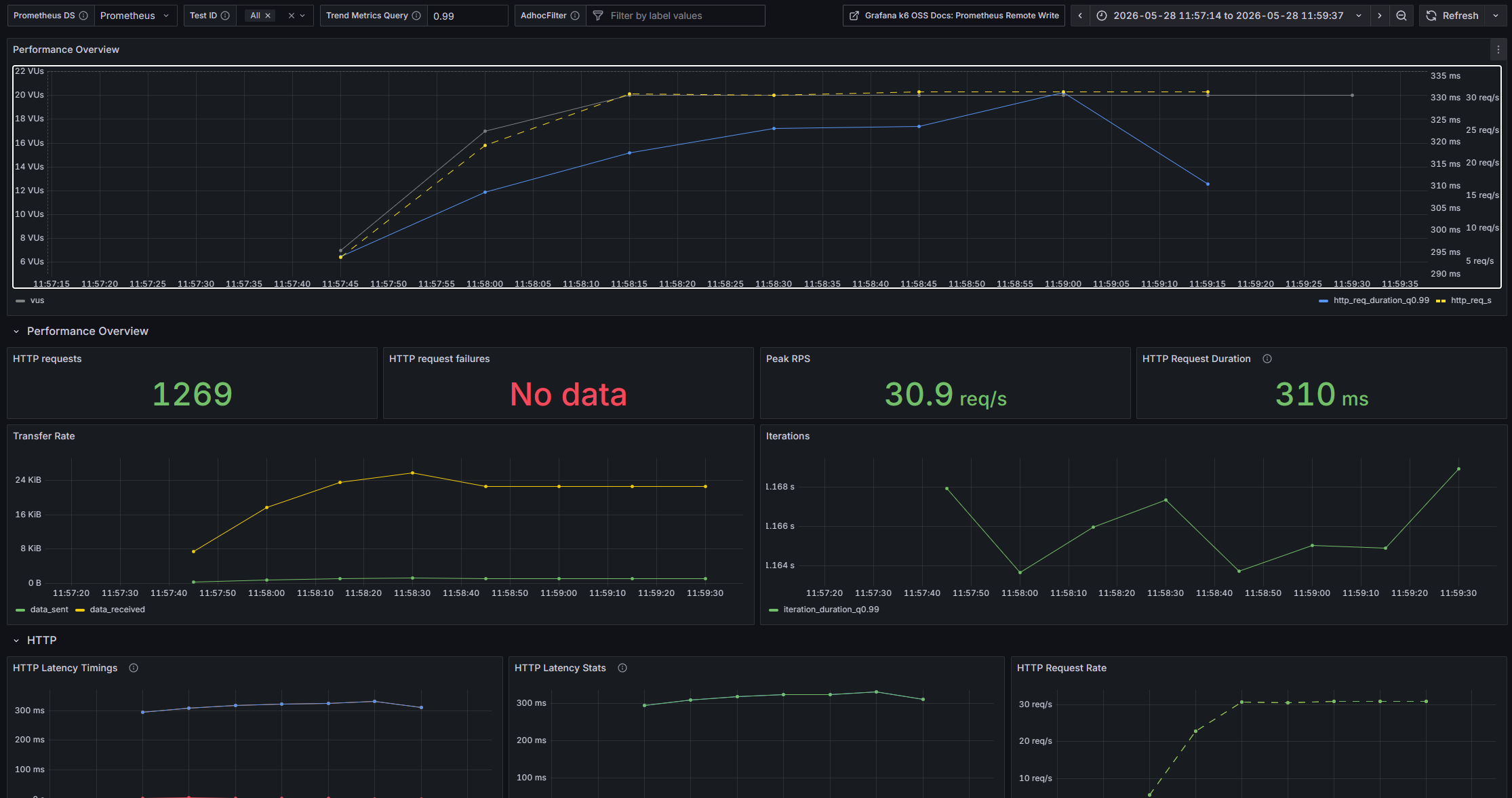
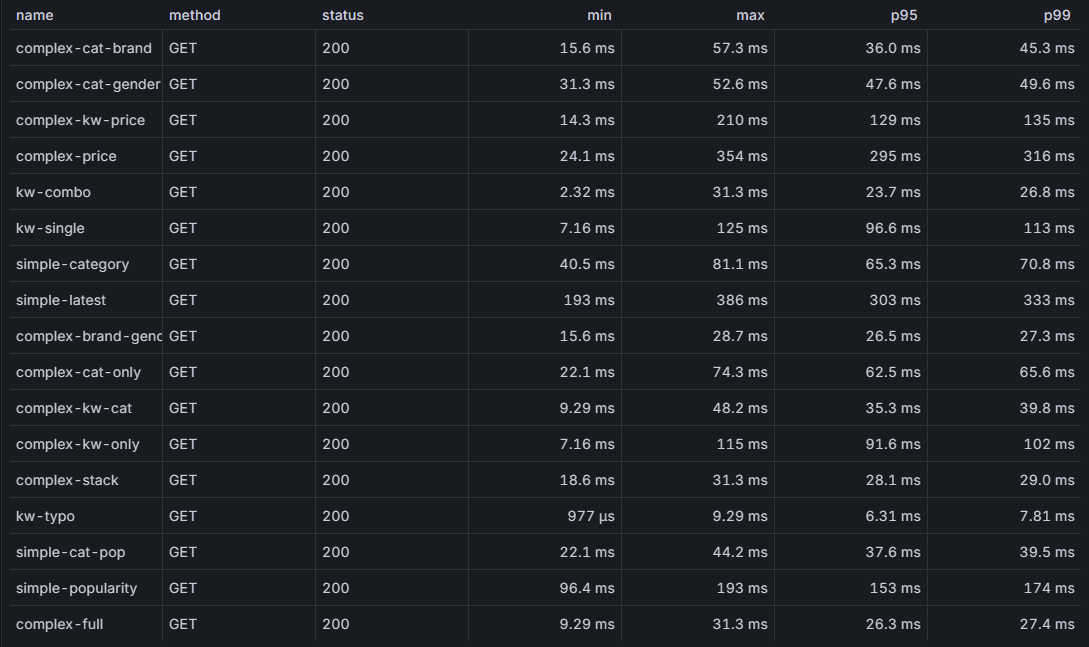
pg 검색 대비 동일환경 테스트에서 전체적인 결과가 안정됐습니다.
그런데 최신순, 인기도순 정렬 조회 및 가격 범위 검색에서
B-Tree 인덱스를 사용한 것과 비교하면 약간의 성능 저하를 보입니다.
ES에서는 B-tree 인덱스가 없습니다. 그래서 sort 비용이 더 큽니다.
대신 sort를 보다 효율적으로 하려면 미리 정렬해서 인덱싱하는 방법이 있는데요,
그렇게 하더라도 sorting 방식을 여러가지로 지정한다면 의미가 없을것입니다.
저는 그래서 이 단계에서 redis 캐싱을 적용하기로 했습니다.
정렬 조회에 캐싱만 적용해도
많은 병목을 줄일 수 있겠다고 판단했습니다.
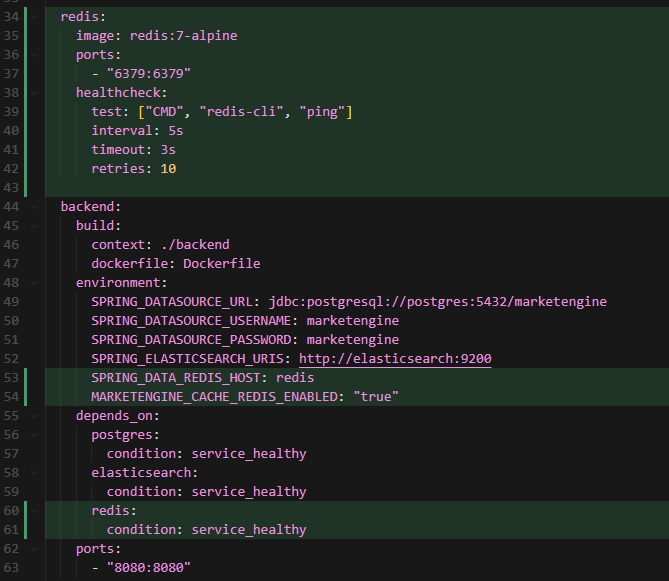
docker compose 설정 - redis 추가
build 의존성 추가 - spring cache, spring redis
    implementation 'org.springframework.boot:spring-boot-starter-cache'
    implementation 'org.springframework.boot:spring-boot-starter-data-redis'
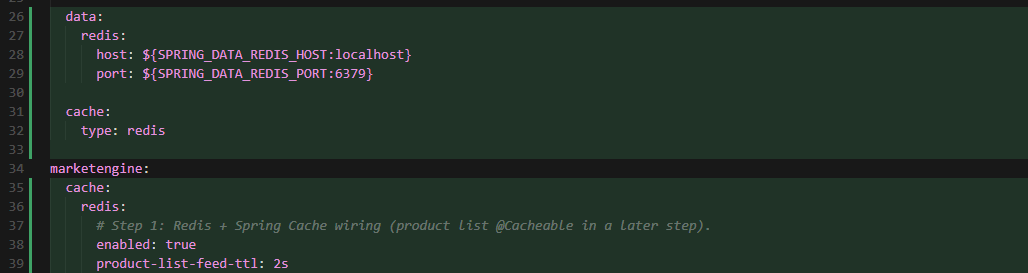
application.yml - redis 설정
RedisCacheConfig.java
package com.marketengine.backend.common.config;

import java.time.Duration;

import org.springframework.beans.factory.annotation.Value;
import org.springframework.boot.autoconfigure.condition.ConditionalOnProperty;
import org.springframework.cache.CacheManager;
import org.springframework.cache.annotation.EnableCaching;
import org.springframework.context.annotation.Bean;
import org.springframework.context.annotation.Configuration;
import org.springframework.data.redis.cache.RedisCacheConfiguration;
import org.springframework.data.redis.cache.RedisCacheManager;
import org.springframework.data.redis.connection.RedisConnectionFactory;
import org.springframework.data.redis.serializer.GenericJackson2JsonRedisSerializer;
import org.springframework.data.redis.serializer.RedisSerializationContext;

/**
 * Step 1 (cache): Redis-backed Spring Cache. Product list feed caching uses {@link #PRODUCT_LIST_FEED} in a later step.
 */
@Configuration
@EnableCaching
@ConditionalOnProperty(prefix = "marketengine.cache.redis", name = "enabled", havingValue = "true", matchIfMissing = true)
public class RedisCacheConfig {

    public static final String PRODUCT_LIST_FEED = "productListFeed";

    @Bean
    RedisCacheConfiguration productListFeedCacheConfiguration(
            @Value("${marketengine.cache.redis.product-list-feed-ttl:2s}") Duration productListFeedTtl
    ) {
        return RedisCacheConfiguration.defaultCacheConfig()
                .entryTtl(productListFeedTtl)
                .disableCachingNullValues()
                .serializeValuesWith(RedisSerializationContext.SerializationPair.fromSerializer(
                        new GenericJackson2JsonRedisSerializer()
                ));
    }

    @Bean
    CacheManager cacheManager(
            RedisConnectionFactory connectionFactory,
            RedisCacheConfiguration productListFeedCacheConfiguration
    ) {
        return RedisCacheManager.builder(connectionFactory)
                .cacheDefaults(productListFeedCacheConfiguration)
                .withCacheConfiguration(PRODUCT_LIST_FEED, productListFeedCacheConfiguration)
                .build();
    }
}
config:
- TTL - 2초
- 직렬화 방식 - JSON
RedisStartupVerifier.java
package com.marketengine.backend.common.config;

import org.springframework.boot.autoconfigure.condition.ConditionalOnProperty;
import org.springframework.boot.context.event.ApplicationReadyEvent;
import org.springframework.context.ApplicationListener;
import org.springframework.data.redis.connection.RedisConnectionFactory;
import org.springframework.stereotype.Component;

import lombok.RequiredArgsConstructor;
import lombok.extern.slf4j.Slf4j;

/**
 * Step 1 (cache): confirms Redis is reachable when cache is enabled.
 */
@Slf4j
@Component
@RequiredArgsConstructor
@ConditionalOnProperty(prefix = "marketengine.cache.redis", name = "enabled", havingValue = "true", matchIfMissing = true)
public class RedisStartupVerifier implements ApplicationListener<ApplicationReadyEvent> {

    private final RedisConnectionFactory redisConnectionFactory;

    @Override
    public void onApplicationEvent(ApplicationReadyEvent event) {
        String ping = redisConnectionFactory.getConnection().ping();
        log.info("Redis connected: ping={}", ping);
    }
}
레디스에서 PING에 대한 헬스체크 응답은 PONG입니다.

service 코드를 수정했습니다.
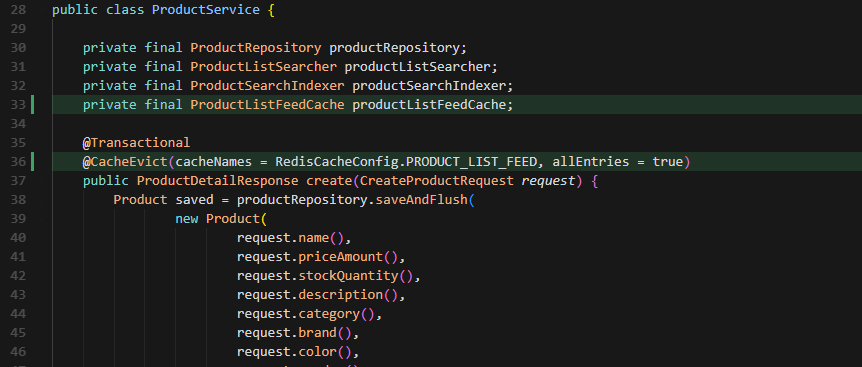
CUD시에는 항상 CacheEvent -> allEntries, 즉 캐시를 전체 비웁니다.
list 호출 시 조건 검사 코드를 추가했습니다.

private boolean isFeedRequest(
            String keyword,
            ProductCategory category,
            String brand,
            String gender,
            String color,
            Integer minPrice,
            Integer maxPrice,
            String sortBy,
            int page,
            int size
    ) {
        if (page != 0 || size != 12) {
            return false;
        }
        if (!("LATEST".equals(sortBy) || "POPULARITY".equals(sortBy))) {
            return false;
        }
        return keyword == null
                && category == null
                && brand == null
                && gender == null
                && color == null
                && minPrice == null
                && maxPrice == null;
    }
단순 sort 호출에 대해서 캐싱을 적용합니다.
ProductListFeedCache.java
package com.marketengine.backend.product.application;

import org.springframework.cache.annotation.Cacheable;
import org.springframework.data.domain.PageRequest;
import org.springframework.data.domain.Pageable;
import org.springframework.data.domain.Slice;
import org.springframework.stereotype.Service;

import com.marketengine.backend.common.config.RedisCacheConfig;
import com.marketengine.backend.product.api.ProductDtos.ProductPageResponse;
import com.marketengine.backend.product.api.ProductDtos.ProductSummaryResponse;

import lombok.RequiredArgsConstructor;

@Service
@RequiredArgsConstructor
public class ProductListFeedCache {

    private final ProductListSearcher productListSearcher;

    @Cacheable(cacheNames = RedisCacheConfig.PRODUCT_LIST_FEED, key = "#sortBy + ':' + #size")
    public ProductPageResponse get(String sortBy, int size) {
        Pageable pageable = PageRequest.of(0, size);
        Slice<ProductSummaryResponse> pageResult = productListSearcher.search(
                null,
                null,
                null,
                null,
                null,
                null,
                null,
                sortBy,
                pageable
        );
        return ProductPageResponse.from(pageResult);
    }
}
key = sortBy + ":" + size (예: LATEST:12, POPULARITY:12)
이제 이 호출은 cache에 저장됩니다.
실행 도중 오류가 발생해서 약간 수정했습니다.
수정 전
@Bean
    RedisCacheConfiguration productListFeedCacheConfiguration(
            @Value("${marketengine.cache.redis.product-list-feed-ttl:2s}") Duration productListFeedTtl
    ) {
        return RedisCacheConfiguration.defaultCacheConfig()
                .entryTtl(productListFeedTtl)
                .disableCachingNullValues()
                .serializeValuesWith(RedisSerializationContext.SerializationPair.fromSerializer(
                        new GenericJackson2JsonRedisSerializer()
                ));
    }
수정 후
@Bean
RedisCacheConfiguration productListFeedCacheConfiguration(
        @Value("${marketengine.cache.redis.product-list-feed-ttl:2s}") Duration productListFeedTtl
) {
    ObjectMapper objectMapper = new ObjectMapper()
            .registerModule(new JavaTimeModule())
            .disable(SerializationFeature.WRITE_DATES_AS_TIMESTAMPS);

    Jackson2JsonRedisSerializer<ProductPageResponse> valueSerializer =
            new Jackson2JsonRedisSerializer<>(objectMapper, ProductPageResponse.class);

    return RedisCacheConfiguration.defaultCacheConfig()
            .entryTtl(productListFeedTtl)
            .disableCachingNullValues()
            .serializeValuesWith(RedisSerializationContext.SerializationPair.fromSerializer(
                    valueSerializer
            ));
}
Configuration에서 값 직렬화를 GenericJackson2JsonRedisSerializer 하는 과정에서
ProductPageResponse DTO 안의 OffsetDateTime 때문에 Redis JSON 직렬화가 실패하는 문제가 발생했습니다.
문제 해결을 위해 JSR-310(Java Time) 지원을 추가했습니다.
ObjectMapper에 JavaTimeModule을 등록해 OffsetDateTime이 JSON으로 저장 및 복원 되도록 했습니다.
또한 productListFeed 캐시는 타입이 ProductPageResponse 고정이므로
타입 메타데이터에 의존하는 대신 고정 Jackson2JsonRedisSerializer<ProductPageResponse>로 전환해서
ClassCast/missing @class 가 발생하지 않게 했습니다.
이 수정으로 slow req가 400건 이상 줄었지만 p95 - p99가 여전히 느려
더 공격적인 cache를 도입했습니다.
캐시 대상 확장: 무필터 / category-only / keyword-only / price-only / keyword+price / keyword+category
TTL 2초 -> 1800초 상향
성능이 매우 크게 향상됐습니다.


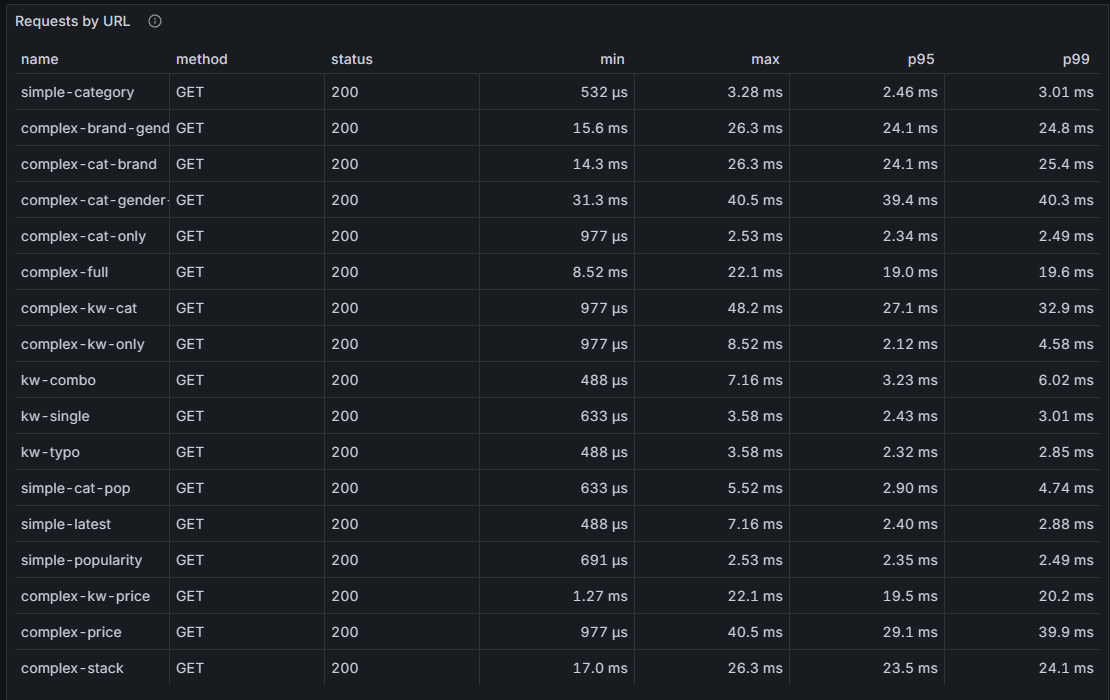
전체 성능
p95 = 20.55ms
p99 = 35.6ms
캐싱 전략을 어떻게 하느냐에 따라서, 더 큰 성능이득을 가질수도 있을것입니다.
하지만 캐싱 자원 부담에 대해서도 생각해야합니다. 복잡도가 너무 높은 캐싱은 좋지는 않습니다.
이 이후부터는 더 정교하고 부하가 더 큰 테스트를 진행하면서
ES 검색 품질을 개선하고, 캐싱 전략을 더 수정하려고 합니다.
그러기 위해서는 k6 테스트 스크립트를 현실에 더욱 가깝게 조정하는 과정을 거쳐야 할 것 같습니다.
'백엔드 엔지니어링 일지' 카테고리의 다른 글
| 마켓 백엔드 엔진 15 : 주문 시스템 개발 (트랜잭션, JUnit) (0) | 2026.06.02 |
|---|---|
| 마켓 백엔드 엔진 14 : k6 검색 로드 테스트 - 2 (0) | 2026.05.29 |
| 마켓 백엔드 엔진 12 : ElasticSearch - 1 (0) | 2026.05.26 |
| 마켓 백엔드 엔진 11 : k6 검색 로드 테스트 - 1 (0) | 2026.05.22 |
| 마켓 백엔드 엔진 10 : 키워드 조합/유사도 검색 - pg_trgm (0) | 2026.05.18 |


