PostgreSQL에서 쿼리 성능을 분석할 때 EXPLAIN을 사용합니다.
EXPLAIN은 쿼리를 실제로 실행하지 않고, 옵티마이저가 계산한 예상 실행 계획만 보여줍니다.
EXPLAIN ANALYZE는 쿼리를 실제로 실행한 뒤, 예측치와 실제 통계를 비교해서 보여줍니다.
데이터 변경시 실제로 변경되므로 주의해야 합니다. 보통 BEGIN - ROLLBACK 사이에서 사용합니다.
EXPLAIN (ANALYZE, BUFFERS) 형태로 사용 시 데이터를 어디서 가져왔는지(메모리 vs 디스크) 상세히 보여줍니다.
성능 최적화의 핵심 지표입니다.
- Actual Time: 각 단계에서 실제로 걸린 시간(ms).
- Actual Rows: 실제로 처리된 행의 수.
- Loops: 해당 작업이 반복된 횟수.
- Shared Hit: PostgreSQL의 메모리(Shared Buffers)에서 데이터를 찾은 경우 (매우 빠름).
- Shared Read: 메모리에 없어 디스크에서 읽어온 경우 (느림, 성능 병목 후보).
EXPLAIN (ANALYZE, BUFFERS) 형태의 sql 스크립트를 만들고
그것을 실행하는 파이썬 쉘 스크립트를 작성하였습니다.
search_scenarios.sql
-- Product search EXPLAIN (ANALYZE, BUFFERS) scenarios — mirrors ProductRepositoryImpl + ProductController defaults:
-- default size 12, sort VIEW => created_at DESC, id DESC; POPULARITY => popularity_score DESC, id DESC.
-- Run: .\scripts\explain\run-explain.ps1 (Postgres up)

\set ON_ERROR_STOP on

\echo ''
\echo '=== S1: list - no filters, default sort (VIEW / newest first), page 0 ==='
EXPLAIN (ANALYZE, BUFFERS)
SELECT id
FROM products
ORDER BY created_at DESC, id DESC
OFFSET 0
LIMIT 12;

\echo ''
\echo '=== S2: list - category SHOES only ==='
EXPLAIN (ANALYZE, BUFFERS)
SELECT id
FROM products
WHERE category = 'SHOES'
ORDER BY created_at DESC, id DESC
OFFSET 0
LIMIT 12;

\echo ''
\echo '=== S3: list - keyword (name OR brand ILIKE), Hibernate containsIgnoreCase pattern ==='
EXPLAIN (ANALYZE, BUFFERS)
SELECT id
FROM products
WHERE name ILIKE '%Nike%' OR brand ILIKE '%Nike%'
ORDER BY created_at DESC, id DESC
OFFSET 0
LIMIT 12;

\echo ''
\echo '=== S4: list - complex filter (category + brand + gender + color + price range) ==='
EXPLAIN (ANALYZE, BUFFERS)
SELECT id
FROM products
WHERE category = 'SHOES'
  AND brand = 'Nike'
  AND gender = 'MEN'
  AND color = 'BLACK'
  AND price_amount >= 40000
  AND price_amount <= 180000
ORDER BY created_at DESC, id DESC
OFFSET 0
LIMIT 12;

\echo ''
\echo '=== S5: list - deep page (~page 833, size 12 => offset 9996) ==='
EXPLAIN (ANALYZE, BUFFERS)
SELECT id
FROM products
ORDER BY created_at DESC, id DESC
OFFSET 9996
LIMIT 12;

\echo ''
\echo '=== S6: list - POPULARITY sort ==='
EXPLAIN (ANALYZE, BUFFERS)
SELECT id
FROM products
ORDER BY popularity_score DESC, id DESC
OFFSET 0
LIMIT 12;

\echo ''
\echo '=== S7: count - same predicates as S4 (pagination total query) ==='
EXPLAIN (ANALYZE, BUFFERS)
SELECT count(*)::bigint
FROM products
WHERE category = 'SHOES'
  AND brand = 'Nike'
  AND gender = 'MEN'
  AND color = 'BLACK'
  AND price_amount >= 40000
  AND price_amount <= 180000;

\echo ''
\echo '=== S8: count - no filters (full table cardinality for total) ==='
EXPLAIN (ANALYZE, BUFFERS)
SELECT count(*)::bigint
FROM products;
| S1 | 조건 없음, 최신순 정렬 상품 12개 보기 | 기본 목록 / 홈 화면 |
| S2 | 카테고리(신발)만 필터해서 최신 12개 보기 | 카테고리 조회 |
| S3 | 이름/브랜드에 “Nike” 포함된 상품 찾기 | 검색 기능 |
| S4 | 여러 조건(카테고리, 가격, 색상 등)으로 필터 후 조회 | 실제 쇼핑몰 필터 |
| S5 | 아주 뒤 페이지(약 833페이지) 조회 | 깊은 페이지 성능 확인 |
| S6 | 최신순이 아니라 인기순으로 12개 보기 | 정렬 기준 변경 |
| S7 | S4 조건으로 총 몇 개 있는지 세기 | 상품 개수 표시 |
| S8 | 전체 상품 개수 세기 | 전체 데이터 규모 확인 |
run-explain.ps1
# Repo root에서 Postgres 컨테이너로 search_scenarios.sql 실행 (postgres 기동 후)
Set-Location (Resolve-Path "$PSScriptRoot\..\..")
Get-Content "$PSScriptRoot\search_scenarios.sql" -Raw | docker compose exec -T postgres psql -U marketengine -d marketengine -v ON_ERROR_STOP=1
실행 명령: .\scripts\explain\run-explain.ps1
10,000,000건의 데이터를 대상으로 쿼리 성능을 측정했습니다.

 Limit  (cost=355419.11..355420.51 rows=12 width=16) (actual time=1707.944..1726.141 rows=12 loops=1)
   Buffers: shared hit=92 read=217225
   ->  Gather Merge  (cost=355419.11..1327733.10 rows=8333538 width=16) (actual time=1662.720..1680.916 rows=12 loops=1)
         Workers Planned: 2
         Workers Launched: 2
         Buffers: shared hit=92 read=217225
         ->  Sort  (cost=354419.09..364836.01 rows=4166769 width=16) (actual time=1645.601..1645.602 rows=8 loops=3)
               Sort Key: created_at DESC, id DESC
               Sort Method: top-N heapsort  Memory: 25kB
               Buffers: shared hit=92 read=217225
               Worker 0:  Sort Method: top-N heapsort  Memory: 25kB
               Worker 1:  Sort Method: top-N heapsort  Memory: 25kB
               ->  Parallel Seq Scan on products  (cost=0.00..258896.69 rows=4166769 width=16) (actual time=2.514..1173.749 rows=3333500 loops=3)
                     Buffers: shared hit=4 read=217225
 Planning:
   Buffers: shared hit=67 read=9
 Planning Time: 3.714 ms
 JIT:
   Functions: 8
   Options: Inlining false, Optimization false, Expressions true, Deforming true
   Timing: Generation 0.728 ms, Inlining 0.000 ms, Optimization 7.536 ms, Emission 44.522 ms, Total 52.786 ms
 Execution Time: 1842.846 ms
(22 rows)
S1 (기본 페이지, 최신순)
- Execution time: 1842ms
- Buffers: shared hit = 92 / read = 217225 (버퍼 캐시에 없던 데이터를 디스크에서 가져온 비중이 큼)
- 스캔: Parallel Seq Scan on products → 테이블 전체에 가깝게 병렬 순차 스캔
| S1 (기본 리스트) | 1842 ms | 92 | 217,225 | Parallel Seq Scan |
| S2 (카테고리 필터) | 482 ms | 188 | 217,129 | Parallel Seq Scan |
| S3 (키워드 검색) | 2456 ms | 284 | 217,033 | Parallel Seq Scan |
| S4 (복합 필터) | 539 ms | 380 | 216,937 | Parallel Seq Scan |
| S5 (deep page) | 1666 ms | 476 | 216,841 | Parallel Seq Scan |
| S6 (인기순 정렬) | 607 ms | 570 | 216,745 | Parallel Seq Scan |
| S7 (count + 필터) | 484 ms | 580 | 216,649 | Parallel Seq Scan |
| S8 (count 전체) | 665 ms | 122 | 27,331 | Parallel Index Only Scan |
모든 EXPLAIN에서 공통으로 보이는 것
- Parallel Seq Scan, 정렬하기 위해 테이블 풀스캔
- Sort 단계 존재: 풀스캔 이후 정렬을 DB에서 진행
- hit/read 비율에서 read가 매우 큼
따라서 첫 번째로 할 일은 products에 (creadted_at, id)를 포함한 B-tree 인덱스를 두는 방법입니다.
인기순 검색도 포함하기 위해, (popularity_score, id) 인덱스도 추가 합니다.
V5__product_search_indexes.sql
-- B-tree indexes aligned with ProductRepositoryImpl ordering:
-- VIEW  -> OrderSpecifier created_at DESC, id DESC
-- POPULARITY -> popularity_score DESC, id DESC

CREATE INDEX idx_products_created_at_id ON products (created_at DESC, id DESC);

CREATE INDEX idx_products_popularity_id ON products (popularity_score DESC, id DESC);
쿼리 성능 재측정 (기본 페이지, 최신순)
 Limit  (cost=0.43..0.80 rows=12 width=16) (actual time=0.048..0.050 rows=12 loops=1)
   Buffers: shared hit=4
   ->  Index Only Scan using idx_products_created_at_id on products  (cost=0.43..304057.81 rows=10000500 width=16) (actual time=0.047..0.048 rows=12 loops=1)
         Heap Fetches: 0
         Buffers: shared hit=4
 Planning:
   Buffers: shared hit=122 read=3
 Planning Time: 1.012 ms
 Execution Time: 0.081 ms
(9 rows)
| S1 (기본 리스트) | 0.08 ms | 4 | 0 | Index Only Scan |
| S2 (카테고리 필터) | 0.05 ms | 8 | 0 | Index Scan |
| S3 (키워드 검색) | 0.17 ms | 10 | 0 | Index Scan |
| S4 (복합 필터) | 8.38 ms | 37 | 689 | Index Scan |
| S5 (deep page) | 0.93 ms | 42 | 0 | Index Only Scan |
| S6 (인기순 정렬) | 0.05 ms | 1 | 3 | Index Only Scan |
| S7 (count + 필터) | 497 ms | 730 | 216,499 | Parallel Seq Scan |
| S8 (count 전체) | 380 ms | 121 | 27,332 | Parallel Index Only Scan |
- Parallel Seq Scan → Index Scan
- Sort 단계 제거됨
- read 거의 없음
- 최신순 검색 1842ms -> 0.08ms
- 키워드 검색 2456ms -> 0.17ms
인덱스만 추가 했는데 많은 부분에서 쿼리 성능이 크게 개선되었습니다.
그러나 복합필터 연산과 count 연산에서 여전히 병렬이 확인됩니다.
필터 검색연산에서 성능 향상을 위해 다음 인덱스를 추가합니다.
CREATE INDEX idx_products_created_at_id ON products (created_at DESC, id DESC);

CREATE INDEX idx_products_popularity_id ON products (popularity_score DESC, id DESC);

CREATE INDEX idx_products_filter_latest_id
    ON products (category, brand, gender, color, created_at DESC, id DESC);

CREATE INDEX idx_products_filter_popularity_id
    ON products (category, brand, gender, color, popularity_score DESC, id DESC);
변경 전
------------------------------------복합 필터 연산----------------------------------------
Limit  (cost=0.43..3847.80 rows=12 width=16) (actual time=0.054..8.972 rows=12 loops=1)
   Buffers: shared hit=56 read=670
   ->  Index Scan using idx_products_created_at_id on products  (cost=0.43..956391.15 rows=2983 width=16) (actual time=0.053..8.968 rows=12 loops=1)
         Filter: ((price_amount >= '40000'::numeric) AND (price_amount <= '180000'::numeric) AND ((category)::text = 'SHOES'::text) AND ((brand)::text = 'Nike'::text) AND ((gender)::text = 'MEN'::text) AND ((color)::text = 'BLACK'::text))
         Rows Removed by Filter: 27142
         Buffers: shared hit=56 read=670
 Planning:
   Buffers: shared hit=18 read=1
 Planning Time: 0.192 ms
 Execution Time: 8.990 ms
(10 rows)

------------------------------------복합 필터 count----------------------------------------
 Finalize Aggregate  (cost=322403.79..322403.80 rows=1 width=8) (actual time=551.275..559.945 rows=1 loops=1)
   Buffers: shared hit=15898 read=201329
   ->  Gather  (cost=322403.58..322403.79 rows=2 width=8) (actual time=551.100..559.933 rows=3 loops=1)
         Workers Planned: 2
         Workers Launched: 2
         Buffers: shared hit=15898 read=201329
         ->  Partial Aggregate  (cost=321403.58..321403.59 rows=1 width=8) (actual time=534.923..534.924 rows=1 loops=3)
               Buffers: shared hit=15898 read=201329
               ->  Parallel Seq Scan on products  (cost=0.00..321400.47 rows=1243 width=0) (actual time=7.214..534.756 rows=944 loops=3)
                     Filter: ((price_amount >= '40000'::numeric) AND (price_amount <= '180000'::numeric) AND ((category)::text = 'SHOES'::text) AND ((brand)::text = 'Nike'::text) AND ((gender)::text = 'MEN'::text) AND ((color)::text = 'BLACK'::text))
                     Rows Removed by Filter: 3332556
                     Buffers: shared hit=15898 read=201329
 Planning:
   Buffers: shared hit=4 read=2
 Planning Time: 0.389 ms
 JIT:
   Functions: 17
   Options: Inlining false, Optimization false, Expressions true, Deforming true
   Timing: Generation 1.945 ms, Inlining 0.000 ms, Optimization 1.060 ms, Emission 17.463 ms, Total 20.468 ms
 Execution Time: 579.238 ms
(20 rows)
변경 후
 ------------------------------------복합 필터 연산----------------------------------------
 Limit  (cost=0.56..60.01 rows=12 width=16) (actual time=0.054..0.137 rows=12 loops=1)
   Buffers: shared hit=14 read=4
   ->  Index Scan using idx_products_filter_latest_id on products  (cost=0.56..14004.89 rows=2827 width=16) (actual time=0.053..0.135 rows=12 loops=1)
         Index Cond: (((category)::text = 'SHOES'::text) AND ((brand)::text = 'Nike'::text) AND ((gender)::text = 'MEN'::text) AND ((color)::text = 'BLACK'::text))
         Filter: ((price_amount >= '40000'::numeric) AND (price_amount <= '180000'::numeric))
         Rows Removed by Filter: 2
         Buffers: shared hit=14 read=4
 Planning:
   Buffers: shared hit=19
 Planning Time: 0.216 ms
 Execution Time: 0.163 ms
(11 rows)
 ------------------------------------복합 필터 count----------------------------------------
 Aggregate  (cost=12927.58..12927.59 rows=1 width=8) (actual time=25.607..25.609 rows=1 loops=1)
   Buffers: shared hit=14 read=3472
   ->  Bitmap Heap Scan on products  (cost=158.22..12920.52 rows=2827 width=0) (actual time=1.760..25.399 rows=2843 loops=1)
         Recheck Cond: (((category)::text = 'SHOES'::text) AND ((brand)::text = 'Nike'::text) AND ((gender)::text = 'MEN'::text) AND ((color)::text = 'BLACK'::text))
         Filter: ((price_amount >= '40000'::numeric) AND (price_amount <= '180000'::numeric))
         Rows Removed by Filter: 640
         Heap Blocks: exact=3457
         Buffers: shared hit=14 read=3472
         ->  Bitmap Index Scan on idx_products_filter_popularity_id  (cost=0.00..157.51 rows=3530 width=0) (actual time=1.371..1.371 rows=3483 loops=1)
               Index Cond: (((category)::text = 'SHOES'::text) AND ((brand)::text = 'Nike'::text) AND ((gender)::text = 'MEN'::text) AND ((color)::text = 'BLACK'::text))
               Buffers: shared read=29
 Planning:
   Buffers: shared hit=6
 Planning Time: 0.121 ms
 Execution Time: 25.724 ms
(15 rows)
복합 필터 연산
Rows Removed by Filter: 27142 -> 2 (불필요한 데이터 접근 크게 감소)
8.99ms -> 0.16ms
복합 필터 count 연산
Parallel Seq Scan -> Bitmap Heap Scan + Bitmap Index Scan
579ms -> 25.7ms
복합필터 연산이 크게 향상되었습니다.
그러나 총 totalCount 연산은 여전히 느리고,
이 지점에서 병목이 생겨 프론트에서 총 로딩 속도는 느립니다.
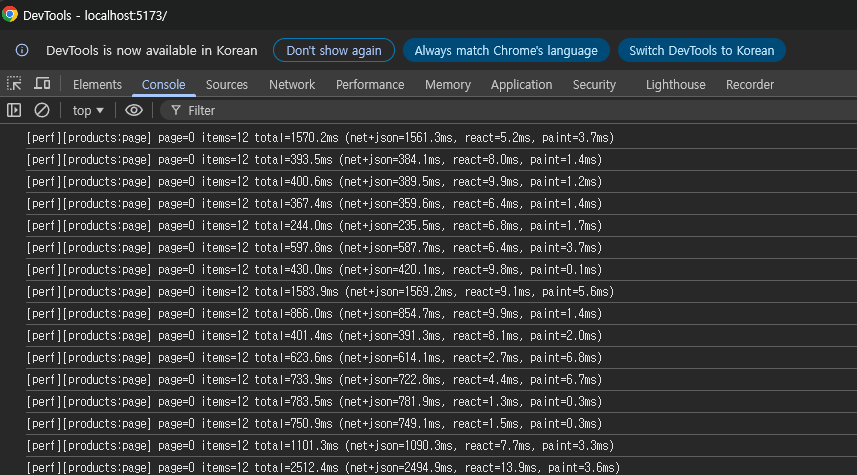
최초 조회 1570ms
이후 평균 500-1000ms
조건 변경시 조회 속도가 매우 튑니다.
Finalize Aggregate  (cost=212799.50..212799.51 rows=1 width=8) (actual time=424.531..433.249 rows=1 loops=1)
   Buffers: shared hit=125 read=27332 written=3
   ->  Gather  (cost=212799.28..212799.49 rows=2 width=8) (actual time=424.353..433.235 rows=3 loops=1)
         Workers Planned: 2
         Workers Launched: 2
         Buffers: shared hit=125 read=27332 written=3
         ->  Partial Aggregate  (cost=211799.28..211799.29 rows=1 width=8) (actual time=407.572..407.573 rows=1 loops=3)
               Buffers: shared hit=125 read=27332 written=3
               ->  Parallel Index Only Scan using products_pkey on products  (cost=0.43..201381.44 rows=4167137 width=0) (actual time=0.055..294.310 rows=3333500 loops=3)
                     Heap Fetches: 300
                     Buffers: shared hit=125 read=27332 written=3
 Planning Time: 0.061 ms
 JIT:
   Functions: 8
   Options: Inlining false, Optimization false, Expressions true, Deforming true
   Timing: Generation 0.521 ms, Inlining 0.000 ms, Optimization 0.756 ms, Emission 9.164 ms, Total 10.441 ms
 Execution Time: 450.423 ms
(17 rows)
totalCount 연산은 row를 모두 확인해야 합니다.
결국 데이터가 많으면 느려집니다.
그래서 count 결과를 redis 캐싱에 저장하는 방법이 있고,
아예 count를 제거하는 방법이 있습니다. (상품 총 개수가 소비자에게는 딱히 중요치 않다는 철학)
저는 page -> slice로 변경하여 totalCount 조회를 제거하고
페이지 버튼을 '더 보기' 형태의 무한 스크롤 형태로 바꿨습니다.
    @Override
    public Slice<Product> search(
            String keyword,
            ProductCategory category,
            String brand,
            String gender,
            String color,
            Integer minPrice,
            Integer maxPrice,
            String sortBy,
            Pageable pageable
    ) {
        QProduct product = QProduct.product;

        List<Product> rows = queryFactory
                .selectFrom(product)
                .where(
                        keywordContains(keyword),
                        categoryEq(category),
                        brandEq(brand),
                        genderEq(gender),
                        colorEq(color),
                        minPriceGoe(minPrice),
                        maxPriceLoe(maxPrice)
                )
                .orderBy(orderSpecifiers(sortBy))
                .offset(pageable.getOffset())
                .limit(pageable.getPageSize() + 1L)
                .fetch();

        boolean hasNext = rows.size() > pageable.getPageSize();
        if (hasNext) {
            rows.remove(rows.size() - 1);
        }

        return new SliceImpl<>(rows, pageable, hasNext);
    }
이전에는 Page<Product>를 반환했고, 지금은 Slice<Product>를 반환합니다.
slice는 total 대신에 hasNext(boolean)를 인자로 받습니다.
limit을 정해둔 페이지 사이즈보다 1개 더 받아서, row가 하나 더 있다면 다음 페이지가 있다고 판단하면 됩니다.
메인 페이지
총 페이지 및 상품 개수 카운트를 제거
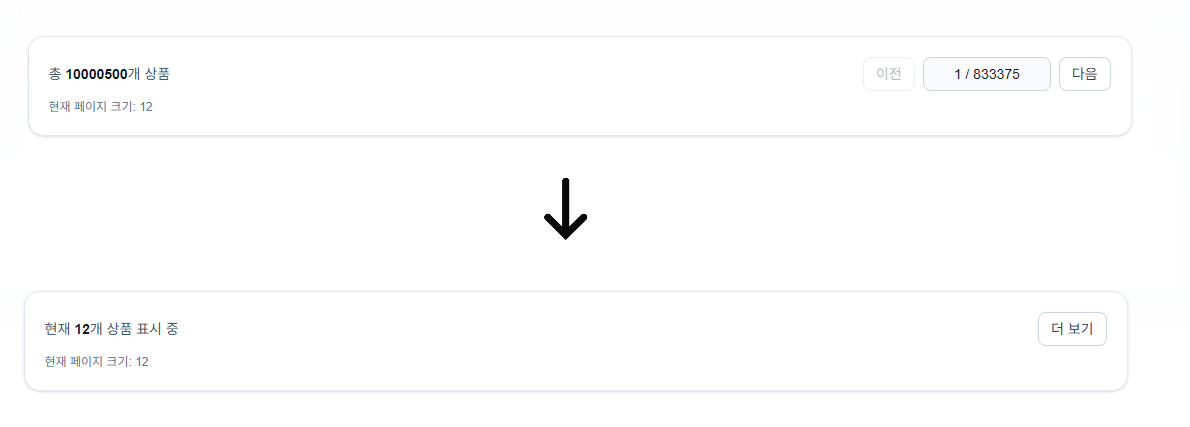
page -> slice 변경 후

최초 조회 497.5ms
이후 평균 조회 속도 25ms
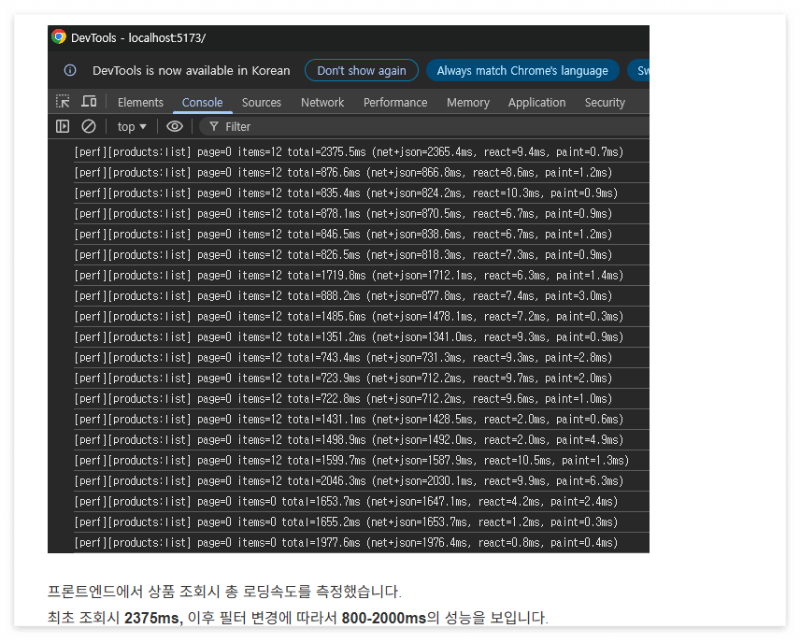
부하 테스트 이전 단일 쿼리에서의 성능 튜닝을 마쳤습니다.
테스트 결과
최초 조회 2375ms -> 497.5ms
평균 조회 1400ms -> 25ms
이제 트래픽이 높은 환경에서의 성능에 대한 실험을 진행하겠습니다.
'백엔드 엔지니어링 일지' 카테고리의 다른 글
| 마켓 백엔드 엔진 7 : Prometheus + Grafana 모니터링 (0) | 2026.04.30 |
|---|---|
| 마켓 백엔드 엔진 6 : QueryDSL로 동적 쿼리 적용 (0) | 2026.04.27 |
| 마켓 백엔드 엔진 5 : product DB 구체화, 대용량 더미 데이터 생성, 검색 기능 개발 (0) | 2026.04.24 |
| 마켓 백엔드 엔진 4 : Next.js 프론트 생성, Docker Compose로 통합 배포, 더미 데이터 생성 (0) | 2026.04.23 |
| 마켓 백엔드 엔진 3 : flyway, JPA, CRUD API, Swagger, Filter (0) | 2026.04.22 |


