운영 및 배포 테스트를 위해서 Docker에 모든 환경을 컨테이너에 올렸으나, Next.js를 통한 빠른 프론트엔드 및 API 개발을 위해서는 로컬 개발환경에서 코드를 빠르게 수정하고 결과물을 보는 것이 효율적입니다.
개발환경 설정을 Docker postgre로 하였기 때문에, 백과 프론트 서버는 로컬 개발환경에서 구동하고 도커 컨테이너에서는 postgres만 구동하면 됩니다.
통합 운영 테스트는 컨테이너에 올려서 진행:
도커 컨테이너 실행
docker compose up --build -d
빠른 개발을 위해 로컬 개발환경에서 진행:
로컬 개발환경 실행
cd c:\Users\chlwl\workspace\backend-engineering
docker compose up -d postgres
cd c:\Users\chlwl\workspace\backend-engineering\backend
.\gradlew.bat bootRun
cd c:\Users\chlwl\workspace\backend-engineering\frontend
npm run dev
product DB 구체화
product를 의류로 구체화하고
검색 및 정렬 기능을 위해 product에 다음과 같은 컬럼을 추가했습니다.
category로 품목을 분류합니다.
정해진 category만 product 생성시 입력받을 수 있게 productDto에 enum class (productCategory)를 적용했습니다.
status에 따라서 판매 가능한 품목을 선별합니다.
priceAmount, brand, color, gender로 필터를 적용하고
popularity_score와 updated_at 에 따라서 최신순, 혹은 인기도순으로 품목을 정렬할 수 있습니다.
프론트도 DB 변경사항에 맞게 update 했습니다.

이제 검색 기능을 최적화 하기 위해서 의미 있는 대용량 데이터를 쌓아야 합니다.
이미지는 placehold.co 서비스를 사용해서 일단 text로 입력하고
브랜드 종류, 가격, 이름 등을 좀 더 다양하고 현실적으로 만든 후 천만개의 데이터를 쌓았습니다.

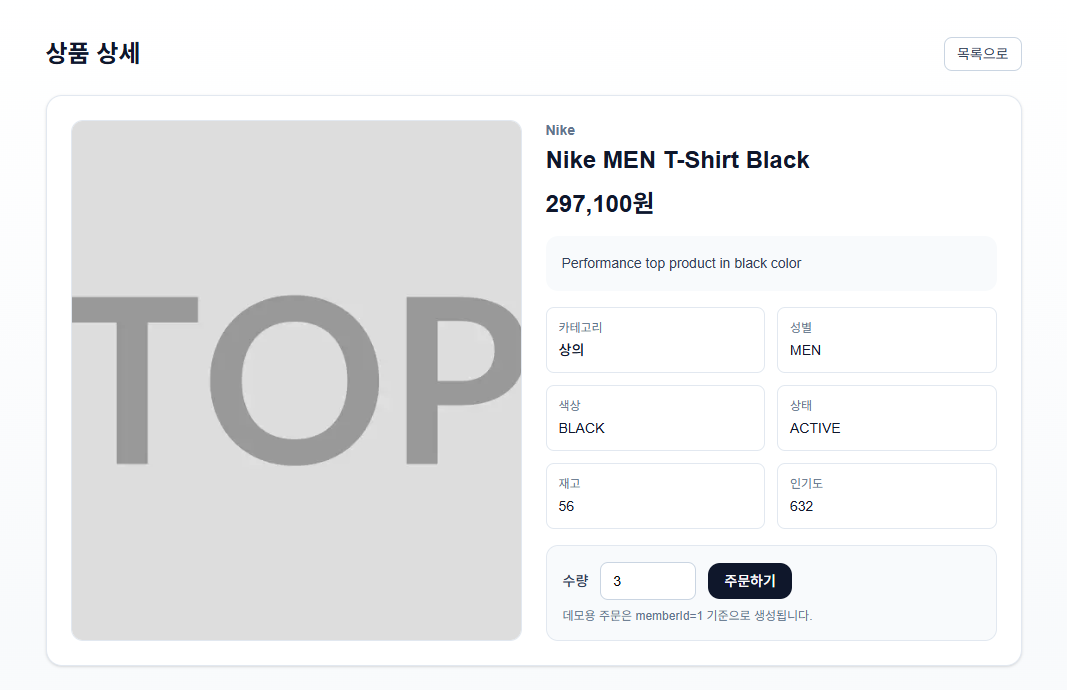
상품 상세 페이지에서 주문을 할 수 있습니다.
ProductRepository에 JpaSpecificationExecutor을 적용했습니다.
package com.marketengine.backend.product.domain;

import org.springframework.data.jpa.repository.JpaRepository;
import org.springframework.data.jpa.repository.JpaSpecificationExecutor;

public interface ProductRepository extends JpaRepository<Product, Long>, JpaSpecificationExecutor<Product> {
}
JpaSpecificationExecutor는 동적 조건 검색을 쉽게 하기 위한 Spring Data JPA 인터페이스입니다.
- 기본 JpaRepository는 정적인 메서드(findByBrandAndColor...)에 강함
- 검색 조건이 많아지면 메서드가 폭발적으로 늘어남
- JpaSpecificationExecutor를 붙이면 Specification 조합으로 조건을 필요할 때만 붙일 수 있음
지금 코드에서:
- ProductRepository가 JpaSpecificationExecutor<Product>를 구현
- productRepository.findAll(spec, pageable) 호출 가능
- 즉, 필터 + 정렬 + 페이징을 한 번에 처리
ProductService.list
public ProductPageResponse list(
            String keyword,
            ProductCategory category,
            String brand,
            String gender,
            String color,
            Integer minPrice,
            Integer maxPrice,
            String sortBy,
            int page,
            int size
    ) {
        Sort sort = "POPULARITY".equalsIgnoreCase(sortBy)
                ? Sort.by(Sort.Direction.DESC, "popularityScore").and(Sort.by(Sort.Direction.DESC, "id"))
                : Sort.by(Sort.Direction.DESC, "createdAt").and(Sort.by(Sort.Direction.DESC, "id"));
        Pageable pageable = PageRequest.of(page, size, sort);

        Specification<Product> spec = (root, query, cb) -> cb.conjunction();
        if (hasText(keyword)) {
            String normalizedKeyword = "%" + keyword.trim().toLowerCase() + "%";
            spec = spec.and((root, query, cb) -> cb.or(
                    cb.like(cb.lower(root.get("name")), normalizedKeyword),
                    cb.like(cb.lower(root.get("brand")), normalizedKeyword)
            ));
        }
        if (category != null) {
            spec = spec.and((root, query, cb) -> cb.equal(root.get("category"), category));
        }
        if (hasText(brand)) {
            spec = spec.and((root, query, cb) -> cb.equal(root.get("brand"), brand.trim()));
        }
        if (hasText(gender)) {
            spec = spec.and((root, query, cb) -> cb.equal(root.get("gender"), gender.trim()));
        }
        if (hasText(color)) {
            spec = spec.and((root, query, cb) -> cb.equal(root.get("color"), color.trim()));
        }
        if (minPrice != null) {
            spec = spec.and((root, query, cb) -> cb.greaterThanOrEqualTo(root.get("priceAmount"), java.math.BigDecimal.valueOf(minPrice)));
        }
        if (maxPrice != null) {
            spec = spec.and((root, query, cb) -> cb.lessThanOrEqualTo(root.get("priceAmount"), java.math.BigDecimal.valueOf(maxPrice)));
        }

        Page<ProductSummaryResponse> pageResult = productRepository.findAll(spec, pageable).map(ProductSummaryResponse::from);
        return ProductPageResponse.from(pageResult);
    }
ProductService.list(...)는 검색 API의 핵심 로직입니다.
역할 순서:
- 정렬 기준 결정
- POPULARITY면 popularityScore desc, id desc
- 아니면 createdAt desc, id desc
- 페이지 객체 생성
- PageRequest.of(page, size, sort)
- 동적 필터 조건 조립 (Specification)
- keyword 있으면 name/brand like
- category, brand, gender, color는 equal
- minPrice, maxPrice는 가격 범위 조건
- DB 조회
- findAll(spec, pageable)
- DTO 변환 + 페이지 응답 포맷 변환
- Page<ProductSummaryResponse>로 매핑
- ProductPageResponse.from(...)으로 반환
핵심 포인트:
- 조건이 없으면 전체조회(페이징 포함)
- 조건이 있으면 해당 조건만 SQL where에 반영
- 프론트는 필요한 페이지 데이터만 받음
ProductController.list
public ResponseEntity<ApiResponse<ProductPageResponse>> list(
            @RequestParam(required = false) String keyword,
            @RequestParam(required = false) ProductCategory category,
            @RequestParam(required = false) String brand,
            @RequestParam(required = false) String gender,
            @RequestParam(required = false) String color,
            @RequestParam(required = false) Integer minPrice,
            @RequestParam(required = false) Integer maxPrice,
            @RequestParam(required = false) String sortBy,
            @RequestParam(required = false) Integer page,
            @RequestParam(required = false) Integer size
    ) {
        int normalizedPage = page == null ? 0 : Math.max(page, 0);
        int normalizedSize = size == null ? 12 : Math.min(Math.max(size, 1), 100);
        String normalizedSort = sortBy == null ? "VIEW" : sortBy;
        return ResponseEntity.ok(ApiResponse.ok(productService.list(
                keyword,
                category,
                brand,
                gender,
                color,
                minPrice,
                maxPrice,
                normalizedSort,
                normalizedPage,
                normalizedSize
        )));
    }
ProductController.list(...)는 HTTP 요청을 서비스에 전달하는 입구입니다.
역할:
- 쿼리 파라미터 수신 (keyword, category, brand, page, size 등)
- 기본값/범위 보정
- page 기본 0, 음수 방지
- size 기본 12, 최소 1 / 최대 100
- sortBy 기본 VIEW
- 서비스 호출
- ApiResponse.ok(...)로 응답 래핑
즉 Controller는:
- “입력 정리/검증 + 서비스 호출” Service는:
- “실제 검색 로직/쿼리 구성/결과 생성”
이렇게 역할이 분리되어 있어서 유지보수와 테스트가 쉬워집니다.
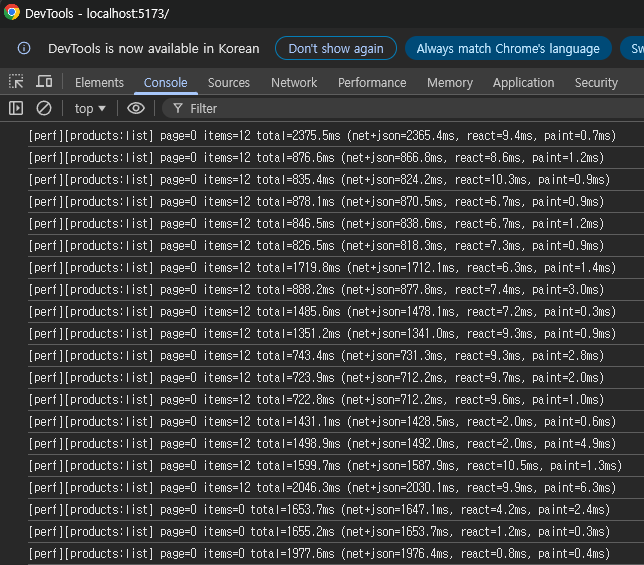
프론트엔드에서 상품 조회시 총 로딩속도를 측정했습니다.
최초 조회시 2375ms, 이후 필터 변경에 따라서 800-2000ms의 성능을 보입니다.
'백엔드 엔지니어링 일지' 카테고리의 다른 글
| 마켓 백엔드 엔진 7 : Prometheus + Grafana 모니터링 (0) | 2026.04.30 |
|---|---|
| 마켓 백엔드 엔진 6 : QueryDSL로 동적 쿼리 적용 (0) | 2026.04.27 |
| 마켓 백엔드 엔진 4 : Next.js 프론트 생성, Docker Compose로 통합 배포, 더미 데이터 생성 (0) | 2026.04.23 |
| 마켓 백엔드 엔진 3 : flyway, JPA, CRUD API, Swagger, Filter (0) | 2026.04.22 |
| 마켓 백엔드 엔진 2 : Github Actions 테스트 자동화 및 Docker Compose로 local PostgreSQL DB 설정 (0) | 2026.04.21 |


